The same key facts are shown for every listing, so you can compare them.
Software
Others
For
Rainbow Six Siege
Platform
Windows
Detection status
Undetected
Updated by buycheats.gg 7 days ago
Price
$9.99 – $59.99
3 options
Payment
Card, via Komerza checkout
Delivery
Through Komerza after payment
Keys and files appear in Orders and Downloads
Seller
visuals.gg
Listing updated
Nov 25, 2026
About this product
Written by the seller.
Visuals Bones – Display skeleton/bone structure of players Box Esp – Draw 2D/3D boxes around players Corner Box Esp – Simplified corner markers instead of full boxes Visible Check – Change visuals based on line of sight Head Circles – Highlight head positions with circular markers Snap Lines – Lines pointing from screen edges to off-screen enemies Target Snap Lines – Lines connecting directly to your current target Visible Chams – Color overlay for visible enemies Hidden Chams – Color overlay for enemies behind walls Render Real Model – Show actual player models through walls Team Check – Differentiate between teammates and enemies LocalPlayer Chams Toggle – Apply chams to your own character Custom Teammate Outline – Customizable outline color for allies Custom Enemy Outline – Customizable outline color for enemies Custom Chams Types [Solid, Wireframe] – Different material styles Custom Chams Modes [Custom Colors, Dark Matter, 3D Rainbow] – Visual effects Custom Visible/Hidden Chams Colors – Separate colors for visible/hidden Custom Visible/Hidden Esp Colors – Custom ESP colors per visibility Custom Misc Colors – Additional color customization options Aimbot Aimbot – Enable automated aiming Visible Only – Only target visible enemies Smoothing – Adjust aim movement smoothness Snap Aim – Instant lock-on to targets Aimbot Fov – Set targeting area size Draw Fov – Visualize the aimbot's FOV circle Auto Recoil Control – Automatic recoil compensation Customizable Recoil Control – Adjustable recoil reduction Misc HotKeys – Customizable keybindings Custom Crosshair – Personalized aiming reticle Custom Colors – Full color customization Custom Chams – Advanced chams customization Custom Menu Keybind [Controller supported] – Menu toggle with controller Black Sky Toggle – Darken or remove skybox Community Chatbox [live text chat with other users] – In-menu chat system Custom Configs – Save and load settings Serverside Config System [Import/Export configs] – Share configs online Triggerbot Triggerbot Delay – Adjust automatic firing delay Triggerbot Team Check – Ignore teammates Custom Triggerbot Accuracy – Set trigger precision Triggerbot Visible Check – Only fire at visible enemies Triggerbot Mode [Full-auto, Semi-auto, Single-Shot] – Firing behavior Triggerbot Keybind [Controller Supported] – Activate with controller
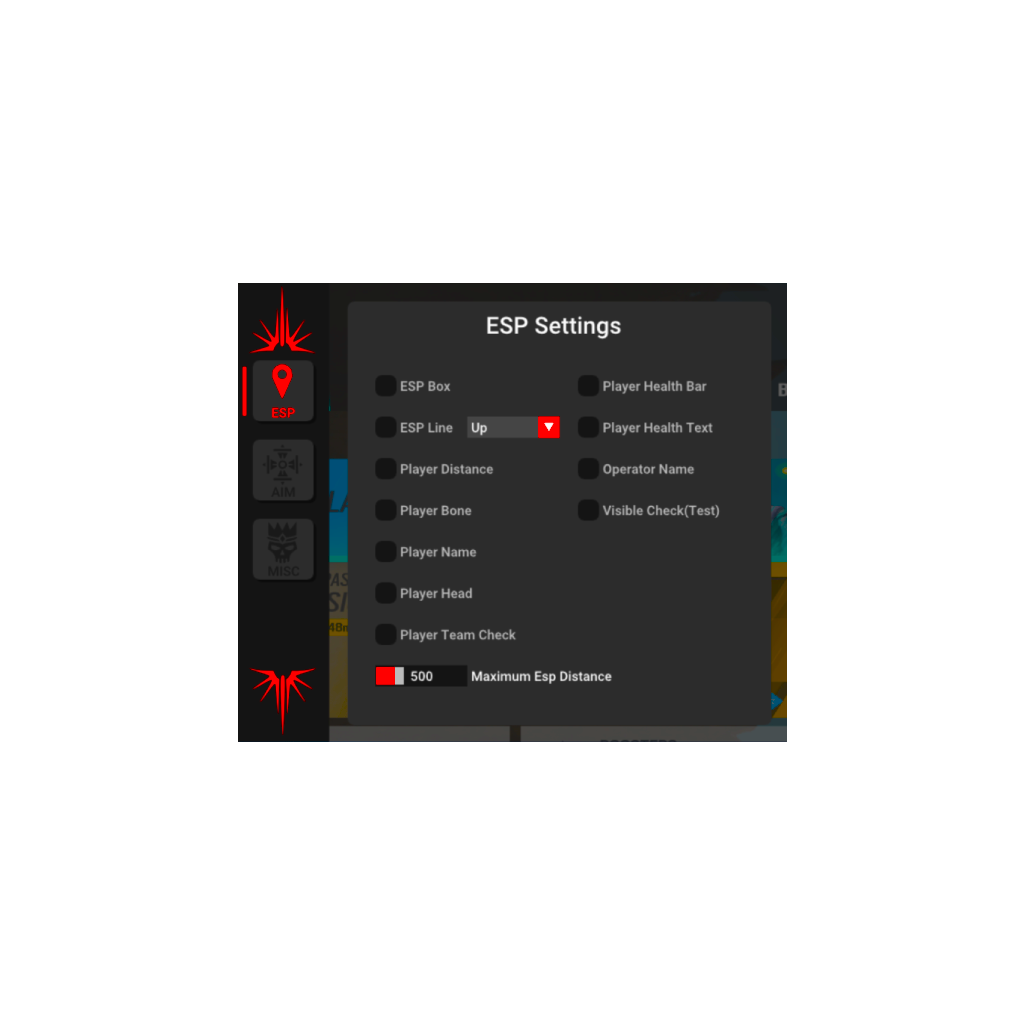
REQUIREMENTS--- Operating System | Windows 10 & 11 Processor | Intel & AMD Video Card | Nvidia & AMD HWID Spoofer Included? | No FEATURES--- [Combat] Active Aimbot - enable aimbot, aiming assistance when shooting Aimbot Keys - ability to set 2 keys to activate the aimbot FOV Size - the size of the area within which the aimbot will capture targets Draw FOV - show the size of the aimbot's working area as a circle around the sight Hitboxes - selection of body parts (bones) that the aimbot will aim at during operation Mark Target - visually mark the current target of the aimbot Sensitivity - sharpness, smoothness of aimbot movements [Visuals] Players - esp for rainbow, shows players behind walls ESP Box - ESP in the form of boxes ESP Line (Up, Center, Bottom) - wh in the form of lines Skeleton - wallhack in the form of skeletons Name - players' nicknames Head - select head hitbox separately using ESP Health (Bar, Text) - display of players' HP Team Check - if you check this box, allies will not be shown (don't check this in arcade) Operator Name - show operator names Distance - distance in meters to enemies Max Distance - limit the range of the wallhack [Misc] Crosshair - static crosshair in the middle of the screen Hit Damage Effect - shows damage dealt to players by shots Gadget ESP - Display Drones and Other Devices with WH Radar ESP - a full-featured 2D radar that displays enemies (with a distinction between enemies higher or lower than your position)
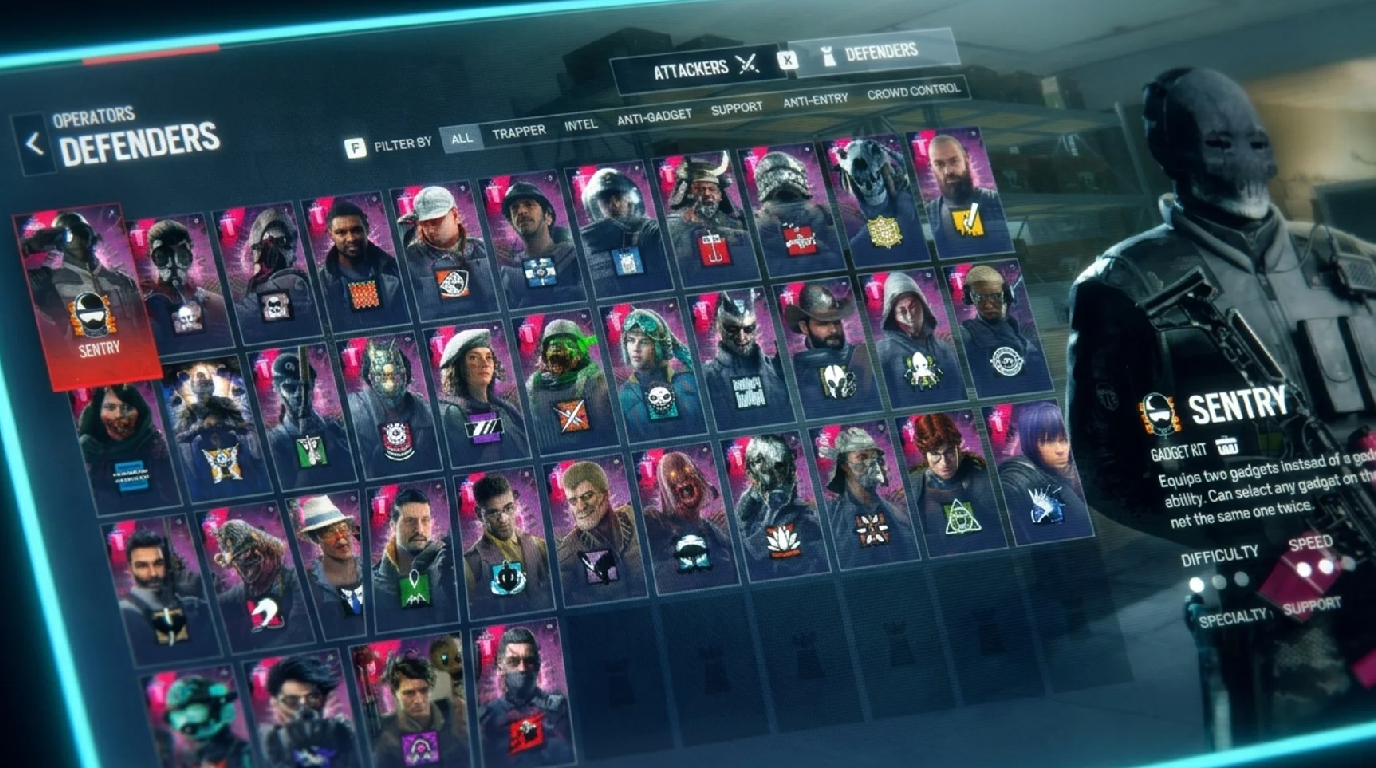
REQUIREMENTS--- Operating System | Windows 10 & 11 FEATURES--- This tool instantly unlocks ALL operators, ALL weapon cosmetics, ALL attachment skins, and ALL weapon charms.
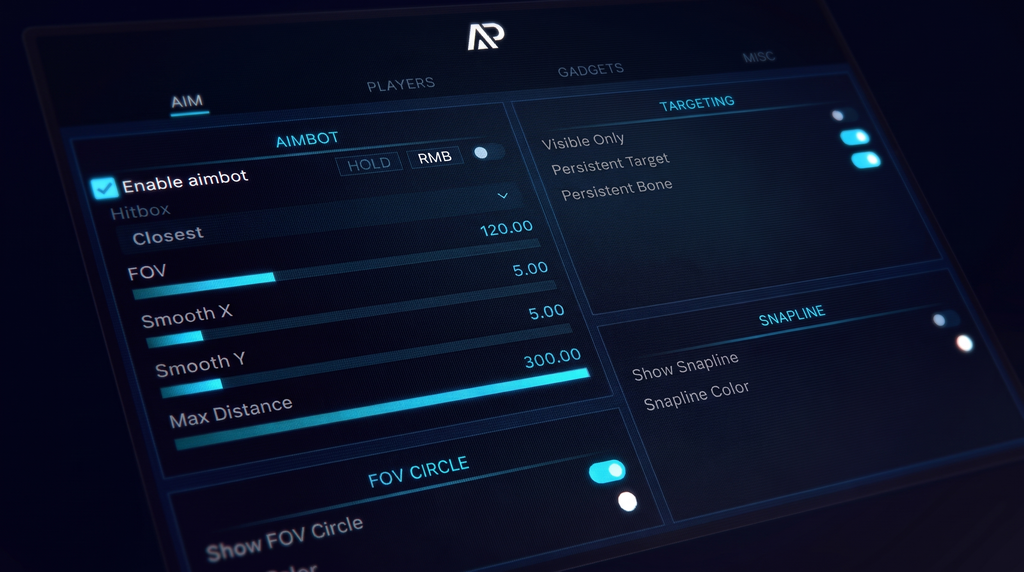
Aimbot FOV – Set the size of the area within which the aimbot captures targets Draw FOV – Display the aimbot's targeting area as a circle on screen Bone select – Choose which body part the aimbot prioritizes Bone vischeck – Only target bones that are currently visible Visible only – Restrict targeting to enemies you can see Skip team – Prevent the aimbot from targeting teammates Skip injured – Ignore downed or injured players No Recoil – Completely eliminates weapon recoil Smooth – Control the fluidity and smoothness of aimbot movements Displacement – Adjust aim offset from the target bone Tremor – Add natural micro-movements to aim for a human-like feel and MORE – Additional aimbot features available Weapon No Recoil – Completely eliminates all weapon recoil Recoil value – Adjust the intensity of recoil reduction No Spread – Removes bullet spread for perfect accuracy Spread value – Adjust the intensity of spread reduction and MORE – Additional weapon features available Player ESP Enemy / Ally – Toggle ESP for enemies and teammates separately Box – Draw a rectangular outline around players Skeleton – Display player skeletal structure through walls Health – Display players' HP as a dynamic bar Name – Display player usernames Distance – Show real-time distance in meters to each player Operator – Display the operator or character each player is using Snaplines – Draw a line from your position to each player Offscreen – Show directional indicators for off-screen players Radar – Mini-map overlay showing player positions Max distance – Set the maximum range for ESP rendering ESP preview – Real-time preview of your ESP settings and MORE – Additional player ESP features available Radar Size – Adjust the overall size of the radar display Range – Set the maximum detection range on radar Compass – Display a compass on the radar and MORE – Additional radar features available Unlock All Weapon skins – Unlock all weapon skins Attach skins – Unlock all attachment skins Charms – Unlock all weapon charms Operators – Unlock all operators Seen by all – All unlocked items are visible to other players and MORE – Additional unlock features available Movement / Exploits SpeedHack – Increase movement speed beyond normal limits JumpHack – Jump higher or infinitely Freecam – Detach the camera from your character for free movement and MORE – Additional movement exploits available Gadget ESP Gadget type – Select which gadget types to display Name – Display gadget names Box – Draw a rectangular outline around gadgets Distance – Show distance in meters to each gadget Snapline – Draw a line from your position to each gadget Drone – Highlight drones Shock Drone – Highlight shock drones Kludge Drone – Highlight kludge drones Yokai – Highlight Yokai drones Airjab – Highlight airjab devices Camera – Highlight cameras and MORE – Additional gadget ESP features available World Sun override – Replace the sun's visual appearance Sun strength – Adjust the intensity of sunlight Lighting – Modify global lighting conditions Light level – Set the overall brightness of the world Sky override – Replace the sky's visual appearance Sky intensity – Adjust the brightness of the sky and MORE – Additional world customization features available Interface Keybind list – Display all active keybinds on screen ESP preview – Real-time preview of your ESP settings and MORE – Additional interface features available
Aim Enable – Activates or deactivates the aimbot system Aim Key – Sets the hotkey to activate the aimbot FOV – Defines the angular radius around your crosshair within which the aimbot searches for targets Draw FOV – Renders a visible circle on screen representing the active aimbot Field of View Bone Mode – Selects which body part the aimbot prioritizes when locking onto enemies Aim Method (Silent / Visible) – Silent sends corrections server-side without moving crosshair; Visible moves your crosshair visibly Smoothing – Controls the speed at which the aimbot transitions toward the target Hitchance – Sets a minimum required hit probability (0–100%) before the aimbot attempts to engage Visibility Check – Restricts the aimbot to only lock onto targets in direct line of sight Prediction – Accounts for bullet travel time and enemy velocity to lead moving targets Bow Charge Bar – Displays a visual charge indicator when using bow weapons Bow Arc Preview – Shows the predicted trajectory arc of bow shots Bone Picker – Opens a detailed selection interface for targeting specific bones Triggerbot – Automatically fires when the crosshair is over an enemy target Weapon No Recoil – Completely eliminates all weapon recoil Recoil Compensation – Automatically counteracts weapon recoil while maintaining natural feel Fast Bow – Removes charge-up time from bow weapons for instant firing No Pullback – Eliminates weapon pullback and draw animations Instant Loot – Accelerates looting interaction speed significantly Safe Mode – Restricts weapon features to safer, less detectable settings Visuals — Players Enable Player ESP – Master toggle for all player-related ESP features Players – Toggles ESP visibility for all human players Sleepers – Enables ESP for sleeping or offline players Show Teammates – Displays friendly players in ESP Ignore Team – Hides teammates from ESP Ignore Friends – Hides players marked as friends from ESP Ignore Sleepers – Hides sleeping players from ESP Ignore Wounded – Hides downed players from ESP Ignore Incapacitated – Hides incapacitated players from ESP Visibility Check – Visually distinguishes between visible and hidden enemies NPCs – Toggles ESP for non-player characters Connected Only – Only shows players actively connected to the server Battle Mode – Toggles a combat-optimized visual preset Box – Draws a rectangular outline around visible players Skeleton – Displays player skeletal structure through walls Snap Lines – Draws a line from your position to each enemy player OOF Arrows – Renders directional arrows pointing to off-screen enemies Hotbar – Shows the items in a player's hotbar Weapon – Displays the currently equipped weapon of each player Name – Shows player usernames Distance – Shows real-time distance in meters to each player Player Chams – Applies a color overlay to player models for better visibility Dormant Cache – Shows cached data of dormant players Visuals — World Enable World ESP – Master toggle for all world-related ESP features Max Distance – Sets the maximum range for world ESP rendering Ore Nodes – Highlights all ore deposits in the environment Stone – Highlights stone ore nodes Metal – Highlights metal ore nodes Sulfur – Highlights sulfur ore nodes Hemp – Highlights hemp plants Stash – Highlights hidden stashes Loot – Highlights lootable items and containers Tool Cupboards – Displays the location of Tool Cupboards Traps – Reveals placed traps and defensive emplacements Buildings – Highlights player-built structures Corpses – Highlights player and NPC corpses Hackable Crates – Highlights hackable loot crates Airdrops – Shows the location of airdrops Dropped Weapons – Highlights weapons dropped on the ground Backpacks – Shows dropped backpacks Animals – Displays all animal positions in the world Vehicles – Highlights all vehicle locations Other – Enables ESP for miscellaneous world entities Remove Layers – Removes specific rendering layers for improved visibility Miscellaneous Bright Night – Increases visibility during nighttime Custom Crosshair – Enables a personalized aiming reticle FOV Changer – Adjusts Field of View beyond normal limits Zoom – Enables a camera zoom function Target Info – Shows detailed information about the current target 3D Model Preview – Displays a 3D model preview of targeted entities HUD Watermark – Displays an on-screen software identifier Toasts – Shows notification popups Loading Popup – Displays a loading indicator Configs Save Config – Saves current settings to a configuration file Load Config – Loads a saved configuration Delete Config – Removes a saved configuration Share Config – Exports your configuration for sharing Import by ID – Imports a configuration using a unique ID Search – Searches through saved configurations Customization Menu Accent Color – Customizes the interface accent color ESP Font – Selects the font style for ESP text ESP Font Size – Adjusts the text size for ESP information Safe Mode – Enables safer, less detectable settings VSync – Toggles vertical sync for smoother visuals Slow Thread – Reduces thread priority for lower CPU usage Status – Displays current software status Friends Friend List – Shows all players marked as friends Add by Steam ID – Adds a player to the friend list using their Steam ID Hide from ESP / Aim – Excludes friends from ESP and aimbot targeting
Aim Enable – Activates the aimbot when the configured hotkey is held or toggled (default: M1), enabling automated target acquisition while firing. Visible Check – Restricts the aimbot to only lock onto targets that are not obstructed by walls or objects, targeting only enemies in direct line of sight. Silent – Sends aim corrections directly to the server without visibly moving your crosshair on the client side. (Requires unlock) Target NPC – Extends aimbot functionality to also lock onto non-player characters such as animals or AI enemies, not just human players. Smooth – Controls the speed at which the aimbot transitions toward the target; lower values produce faster snapping while higher values simulate more natural, human-like movement. Hitchance – Sets a minimum required hit probability (0–100%) before the aimbot attempts to engage, reducing wasted shots on difficult or fast-moving targets. FOV – Defines the angular radius around your crosshair within which the aimbot searches for and locks onto valid targets. Max Distance – Sets the maximum range in meters at which the aimbot will engage; enemies beyond this threshold are ignored entirely. Draw FOV – Renders a visible circle on screen representing the active aimbot Field of View, helping you visualize the current targeting zone. Line to Target – Draws a line from your crosshair toward the currently locked aimbot target for quick visual confirmation of the lock. Prediction Dot – Displays a dot indicating the predicted future position of a moving target, accounting for bullet travel time and enemy velocity. Aim Bone – Selects which body part(s) the aimbot prioritizes when locking onto enemies (e.g., Head, Pelvis, Legs). Enable Hitbox Override – Allows manual overriding of the automatically selected bone with a fully custom selection. Override Bone – Specifies the exact bone to target when hitbox override is active, defaulting to Head. Weapon Recoil Compensation – Automatically counteracts weapon recoil by adjusting your aim downward after each shot, keeping the crosshair stable on target during sustained fire. No Recoil – Completely eliminates all weapon recoil, making the crosshair remain perfectly stationary regardless of fire rate. No Spread – Removes bullet spread from all weapons, ensuring every shot lands precisely at the crosshair position. Shotgun No Spread – Disables pellet spread specifically for shotgun-type weapons, causing all pellets to converge on a single point of impact. Force Automatic – Forces any weapon into full-automatic fire mode, regardless of its default or intended fire mode. Fast Bullet – Increases projectile travel speed significantly, reducing bullet drop and time-to-hit for easier long-range engagements. Rapid Fire – Increases the fire rate of your equipped weapon far beyond its normal limits. Fat Bullet – Enlarges each bullet's effective hitbox, making it easier to land shots even with imprecise aim. Always Shoot – Forces the weapon to fire continuously under all conditions, bypassing restrictions that would normally prevent shooting. Instant Eoka – Makes the Eoka Pistol fire successfully on the very first attempt, removing its random delay and misfire mechanic entirely. Instant Bow – Eliminates the charge-up time from bow weapons, allowing them to fire at full power the moment the fire key is pressed. Instant Compound – Removes the draw time from the Compound Bow, enabling it to release at maximum damage instantly without holding the aim button. Visual – Player Enable – Master toggle that activates all player-related ESP features, revealing enemy positions and information through walls and terrain. Visible Check – Visually distinguishes between enemies in direct line of sight versus those hidden behind obstacles, typically using different colors. Distance – Sets the maximum range in meters at which player ESP information is rendered; players beyond this value are not displayed. Sleepers – Enables ESP for sleeping or offline players, displaying their location even while they are completely stationary and inactive. Wounded – Highlights players who are in a downed or critically wounded state, making it easy to spot and locate incapacitated enemies. Draw Indicators – Renders directional arrows pointing toward enemies that are currently outside your field of view, helping you track off-screen targets. Indicator Settings – Opens a sub-menu to customize the size, color, and behavior of the off-screen directional indicators. Draw on Map – Plots enemy player positions as markers on the in-game map for a broader, server-wide situational overview. Draw on Radar – Shows enemy player positions on the HUD radar element, providing constant positional awareness without opening the full map. Player Chams – Applies a special shader or material override to enemy player models, rendering them visible through walls in a distinct color or style. Visual – Objects Sleeping Bag – Highlights all placed sleeping bags through walls and terrain, revealing enemy respawn points and base perimeters. Cupboards – Displays the location of Tool Cupboards (TCs) through walls, exposing the authorization zone and ownership of nearby structures. Workbenches – Makes workbench locations visible through walls, helping identify enemy bases by their crafting infrastructure. Gun Trap – Reveals placed gun traps through walls so you can detect and approach them safely without triggering them. Turret – Shows the location of auto turrets through walls, allowing you to identify and plan routes around automated defensive emplacements. Sam Site – Highlights SAM Site positions through the environment, warning you of anti-air emplacements before approaching by air. Flame Turret – Displays flame turret positions through walls, helping you navigate around fire-based area denial traps. Land Mine – Reveals all placed land mines on the ground before you step on them, preventing accidental detonation. Corpses – Highlights player and NPC loot bags through walls, allowing you to quickly locate and loot kills at a distance. Backpacks – Shows the position of dropped backpacks and large loot containers through walls and terrain. Dropped Items – Displays the location of all loose items on the ground, making it easy to spot loot without needing direct line of sight. Mini Copter – Renders the position of Minicopters through the environment, helping you locate or track available aircraft. Scrap Heli – Highlights Scrap Transport Helicopters in the world for locating transport or monitoring enemy air traffic. Bicycle – Shows the position of pedal bikes in the world for easy vehicle discovery. Motor Bike – Displays Motorbike locations through the environment, streamlining vehicle acquisition. Horse – Reveals horse positions across the map, making it significantly easier to find and tame mounts. Boat – Highlights boat locations through terrain and on water, helping you find water transport or track enemy naval movements. Visual – Other Sulfur – Highlights sulfur ore nodes through terrain, making it easy to locate and prioritize this critical resource for crafting explosives. Metal – Reveals metal ore nodes through walls and terrain, streamlining the farming of this essential crafting material. Stone – Displays stone ore node positions through terrain, helping you efficiently plan basic resource routes. Hemp – Shows the location of hemp plants through terrain, allowing quick collection of cloth and rope materials. Crates – Reveals military and supply crate positions through walls and terrain, helping you prioritize high-value loot spawns. Animals – Displays the position of all animals (wolves, bears, boars, deer, etc.) in the world, useful for both farming and threat avoidance. Bradley – Shows the current position of the Bradley APC on the map, allowing you to plan engagements or avoid it entirely. Chinook – Highlights the Chinook helicopter's position and crate drop location so you can respond to supply events before other players. Patrolheli – Displays the Patrol Helicopter's current position, helping you track it for farming opportunities or to avoid surprise attacks. Show on Map – Plots active raid events as indicators directly on the in-game map so you can monitor ongoing raids across the server. Notifications – Triggers on-screen HUD alerts when a raid event is detected within a configured range. HUD Hitmarkers – Displays a visual indicator on screen each time you successfully land a hit on an enemy, providing clear damage confirmation. Rocket Helper – Provides a visual overlay to assist with rocket launcher aiming, accounting for projectile arc and travel time. Reload Indicator – Shows a visual progress indicator on screen while your weapon is reloading, providing clear feedback independent of animation. Local Bullet Tracer – Renders visible tracer lines for bullets fired by your own character, allowing you to visually track and adjust your shots. World Bullet Tracer – Displays tracer lines for all bullets fired in the game world by any player, giving directional information about incoming fire. Copy Steam Link – Binds a key (default: F) to automatically copy the Steam profile link of your current ESP target to the clipboard. Hotbar – Displays an enhanced HUD overlay of your hotbar, showing currently equipped items and their states at a glance. Clothes – Shows the clothing and armor items equipped by your current ESP target in the HUD, giving insight into their level of protection. Enable Radar – Activates a minimap-style radar overlay on the HUD that displays the positions of nearby players and other entities in real time. Radar Settings – Opens a sub-menu to configure the radar's size, zoom level, range, and which entity types are displayed. Hand Chams – Applies a custom shader or color to your own first-person hand and arm models for visual customization. Gun Chams – Applies a custom material or color effect to your held weapon's first-person view model. Watermark – Displays a subtle on-screen text watermark, typically showing the software name or your username as an identifier. Bind Island – Shows a HUD indicator with relevant binding or session information tied to the current server connection. Miscellaneous – Main Infinity Jump – Allows repeated jumping without landing, enabling continuous upward movement or access to otherwise unreachable elevated positions. Speedhack – Increases your movement speed beyond normal limits, activated by a configurable hotkey. Spider – Enables wall-climbing movement, allowing your character to walk up and adhere to vertical surfaces. Always Sprint – Keeps your character permanently sprinting without needing to hold the sprint key. Debug Camera – Activates a free-floating spectator camera fully detached from your character for unrestricted world viewing. Third Person – Switches your perspective to a third-person camera view positioned behind your character. Zoom – Enables a camera zoom function that magnifies your view, simulating a scope without needing a scoped weapon. FOV Changer – Adjusts your Field of View beyond the normal in-game slider range for a wider or narrower perspective. Aspect Ratio – Modifies the game's rendered aspect ratio, stretching or compressing the image for personal preference or competitive advantage. No Weapon Bob – Disables idle weapon sway and movement bob animations, keeping the weapon model perfectly still at all times. No Weapon Lower – Prevents the weapon from lowering during sprinting or other actions, keeping it permanently raised and ready to fire. No Weapon Animation – Disables all weapon animations entirely, removing visual distractions and motion blur during combat. Battle Mode – Activates a preset configuration optimized for combat, toggled quickly with a hotkey. Change Hand Position – Allows manual adjustment of the first-person weapon and hand model offset from the default screen position. Remove Layers – Strips specific rendering layers or post-processing effects from the game world to improve visibility. Fast Loot – Accelerates the looting interaction speed, allowing containers to be emptied significantly faster than normal. Instant Revive – Eliminates the revive animation delay entirely, allowing teammates to be brought back instantly. Loot Tied Crates – Automatically opens and loots locked or tied crates without requiring the normal tool or interaction time. Drop All Items – Instantly drops your entire inventory to the ground with a single key press. Miscellaneous – World Bright Ambient – Increases the global ambient lighting level, effectively eliminating darkness and making nighttime as bright as midday. Fog Color – Allows customization or complete removal of the game's fog effect, improving long-range visibility in foggy conditions. Sky Color – Changes the sky's rendered color, offering visual customization or the removal of sky-based atmospheric visibility limitations. Change Clouds – Modifies or entirely removes cloud rendering, affecting both aesthetics and potential overhead visibility obstructions. Change Stars – Alters the appearance and intensity of stars rendered in the night sky for visual customization. Change Time – Overrides the server's time of day on the client side, allowing you to simulate full daylight at any point in the day/night cycle. Change Atmosphere – Modifies atmospheric rendering effects such as haze, light scattering, and ambient toning for improved clarity. Change Weather – Overrides current weather conditions on the client side, eliminating rain, storms, or other visibility-impairing effects.
Core Features One-Click Spoofing – Instantly change your HWID with a single click—fast and simple Comprehensive Spoof & Clean – Spoofs all hardware traces and cleans previous logs for a fresh identity Built-in HWID Checker – Verify your current HWID and confirm the spoof worked Custom Seeding System – Generates unique, personalized serials for maximum reliability and ban resistance Integrated Support System – 24/7 in-app help with live chat, tickets, and instant guides Supported Anti-Cheats & Games EasyAntiCheat (EAC) - Fortnite (Tournament-Ready) + Advanced Cleaner - Apex Legends + Cleaner - Rust + Cleaner - Dead by Daylight - Elden Ring - ARC Raiders - & more… BattlEye (BE) - Tom Clancy's Rainbow Six Siege + Cleaner - Escape from Tarkov - ARK: Survival Evolved - DayZ - Arma 3 - & more... RICOCHET - All Call of Duty Titles (Warzone, Modern Warfare series, Black Ops 6, Black Ops 7) - & more... AntiCheatExpert (ACE) - Delta Force: Hawk Ops - Arena Breakout: Infinite - Tencent-published titles - & more... FiveGuard - FiveM + Cleaner (Grand Theft Auto V RP servers) - & more... Javelin (EA anticheat) - Battlefield 2042 - Battlefield V - Battlefield 1 - Madden NFL series - FIFA / EA FC Series - & more... Miscellaneous & Compatibility Universal Motherboard Support – Compatible with all motherboard types UEFI and Legacy BIOS Compatible – Works on both modern and older systems User-Friendly Interface – Easy to navigate and operate Regular Updates – Frequently updated for new anti-cheats and games Secure & Private – No logging, encrypted data, and user privacy maintained